> ## Documentation Index
> Fetch the complete documentation index at: https://ayrshare.mintlify.site/llms.txt
> Use this file to discover all available pages before exploring further.

# Troubleshooting Facebook Posting Issues | Ayrshare Docs

> Fix the most common Facebook posting problems in Ayrshare, including failed posts, permissions, and media errors, with clear step-by-step troubleshooting.

If you receive an error when posting that indicates Facebook permission issues or you don't see a Facebook Page listed, it could be that some access permissions were not granted

## Facebook Business Admin Settings

<div class="video-container">
  <iframe width="560" height="315" src="https://www.youtube.com/embed/xQv2TakQSVw" title="Post a video to Facebook with an API" frameborder="0" allow="accelerometer; autoplay; clipboard-write; encrypted-media; gyroscope; picture-in-picture" allowfullscreen />
</div>

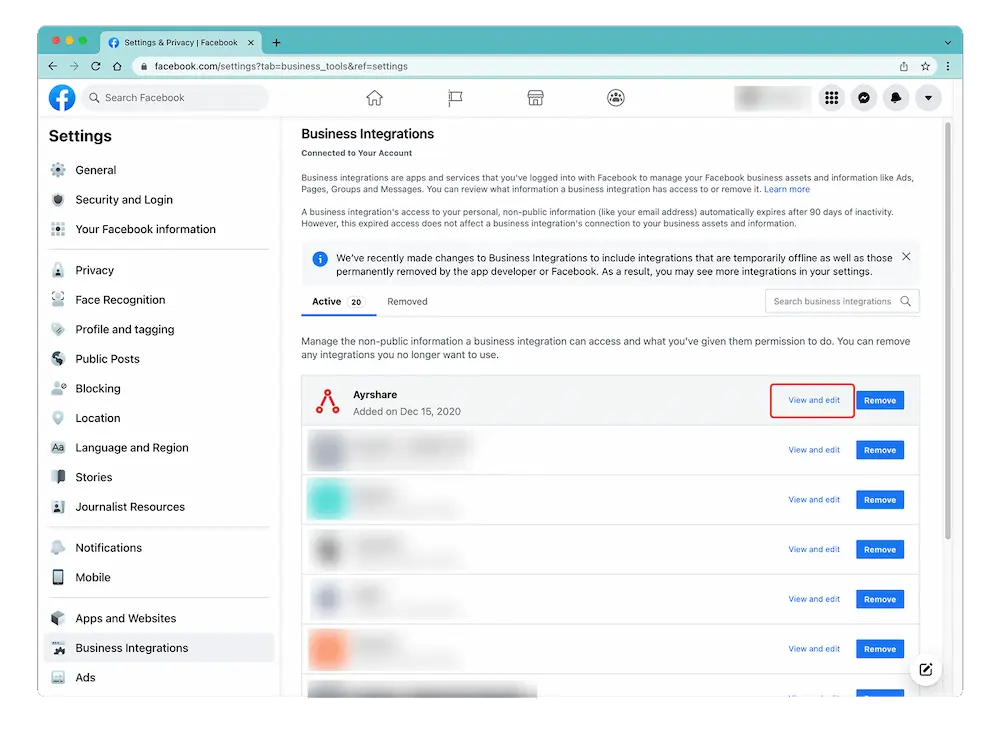
Access the Business Integration page by logging into Facebook and go to "Setting" -> "Settings & Privacy" -> "Security & Login" -> "Business Integration".

<Card title="Facebook Settings & Privacy" icon="facebook" href="https://www.facebook.com/settings?tab=business_tools%5C&ref=settings" horizontal>
  Click here for a direct link to the Facebook Setting & Privacy page.
</Card>

## Edit Facebook Permissions

On the [Business Integration page](https://www.facebook.com/help/405094243235242/), click the Ayrshare App and choose "View and Edit".

<img src="https://mintcdn.com/ayrshare/XRYzr5UdPjyr_kPK/images/additional/fb%20permissions.webp?fit=max&auto=format&n=XRYzr5UdPjyr_kPK&q=85&s=c39f79d8f396bda969e73be47902e215" alt="Verify Facebook permissions" class="center" width="1000" height="746" data-path="images/additional/fb permissions.webp" />

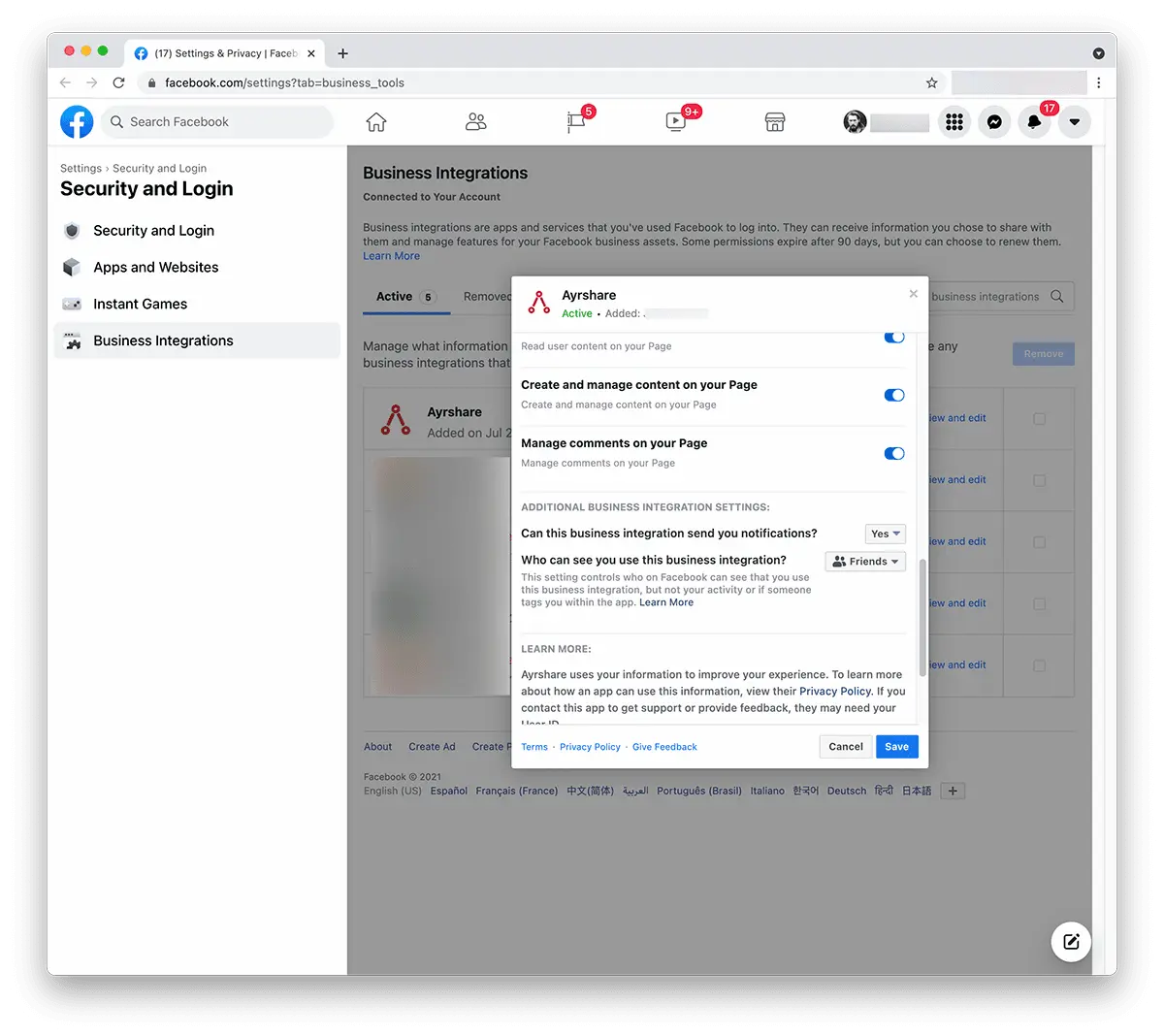
A pop-up will show. Scroll down to "Create and Manage Content on Your Page" and ensure that it is enabled. If you see a checkbox with "Pages" then check it to select all pages.
<img src="https://mintcdn.com/ayrshare/XRYzr5UdPjyr_kPK/images/additional/allow%20FB%20permissions.webp?fit=max&auto=format&n=XRYzr5UdPjyr_kPK&q=85&s=537380da9a6964191c0810a6027e3462" alt="Review Ayrshare Facebook permissions" class="center" width="1200" height="1068" data-path="images/additional/allow FB permissions.webp" />

Click "**Save**".

Head back to the [Ayrshare Dashboard](https://app.ayrshare.com/social-accounts) and **unlink** and **relink** Facebook. You should now have the correct permissions.

## Still Having Issue with Facebook Permissions?

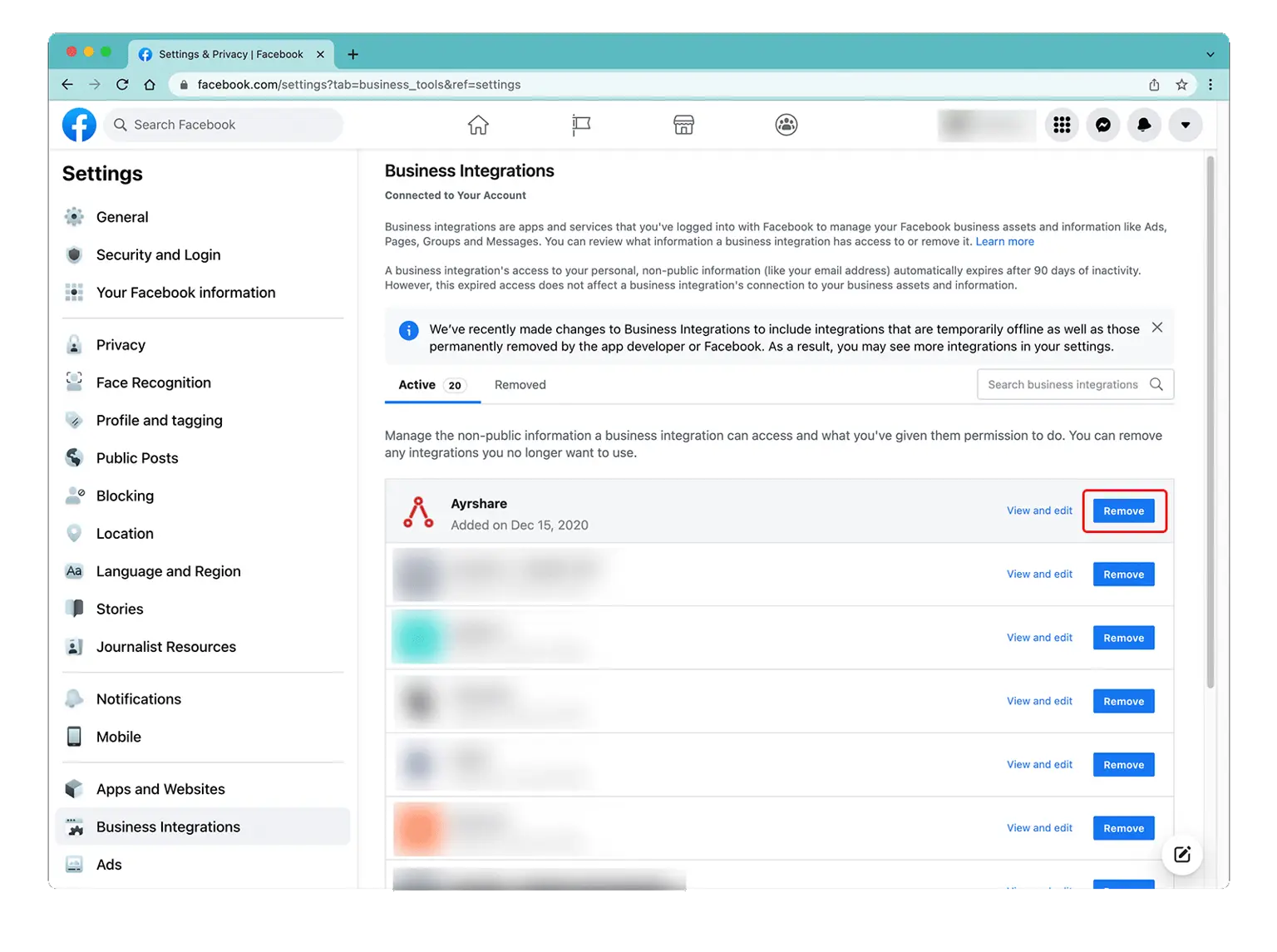
*If the issue still persists*, please go back into the [Facebook admin settings](/help-center/technical-support/facebook_posting_issues#facebook-business-admin-settings) under Business Integration and "Remove" the Ayrshare app.
Go back into the [Ayrshare Dashboard](https://app.ayrshare.com/social-accounts) **unlink** and **relink** Facebook.
<img src="https://mintcdn.com/ayrshare/xrGl9DrFFYfXkVdh/images/help-center/remove-a.webp?fit=max&auto=format&n=xrGl9DrFFYfXkVdh&q=85&s=b2300de11a253cc217b3c7aeddd6b50d" alt="Remove the Ayrshare app" class="center" width="1536" height="1145" data-path="images/help-center/remove-a.webp" />
