> ## Documentation Index
> Fetch the complete documentation index at: https://ayrshare.mintlify.site/llms.txt
> Use this file to discover all available pages before exploring further.

# Facebook पोस्टिंग समस्याओं का समस्या निवारण | Ayrshare Docs

> Ayrshare में सबसे आम Facebook पोस्टिंग समस्याओं को ठीक करें, जिसमें विफल पोस्ट, अनुमतियाँ, और मीडिया त्रुटियाँ शामिल हैं, स्पष्ट चरण-दर-चरण समस्या निवारण के साथ।

यदि आपको पोस्ट करते समय एक त्रुटि मिलती है जो Facebook अनुमति समस्याओं का संकेत देती है या आपको एक Facebook Page सूचीबद्ध नहीं दिखता है, तो हो सकता है कि कुछ एक्सेस अनुमतियाँ प्रदान नहीं की गई हों।

## Facebook Business Admin Settings

<div class="video-container">
  <iframe width="560" height="315" src="https://www.youtube.com/embed/xQv2TakQSVw" title="Post a video to Facebook with an API" frameborder="0" allow="accelerometer; autoplay; clipboard-write; encrypted-media; gyroscope; picture-in-picture" allowfullscreen />
</div>

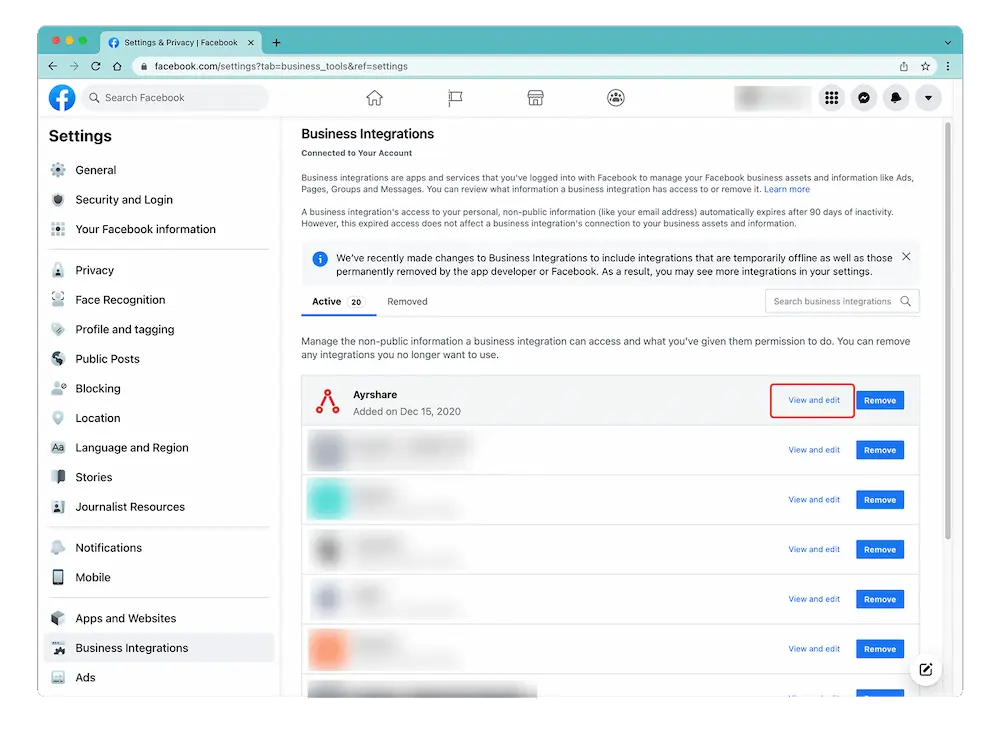
Facebook में लॉग इन करके और "Setting" -> "Settings & Privacy" -> "Security & Login" -> "Business Integration" पर जाकर Business Integration पृष्ठ तक पहुँचें।

<Card title="Facebook Settings & Privacy" icon="facebook" href="https://www.facebook.com/settings?tab=business_tools%5C&ref=settings" horizontal>
  Facebook Setting & Privacy पृष्ठ के सीधे लिंक के लिए यहाँ क्लिक करें।
</Card>

## Facebook अनुमतियाँ संपादित करें

[Business Integration पृष्ठ](https://www.facebook.com/help/405094243235242/) पर, Ayrshare App पर क्लिक करें और "View and Edit" चुनें।

<img src="https://mintcdn.com/ayrshare/XRYzr5UdPjyr_kPK/images/additional/fb%20permissions.webp?fit=max&auto=format&n=XRYzr5UdPjyr_kPK&q=85&s=c39f79d8f396bda969e73be47902e215" alt="Verify Facebook permissions" class="center" width="1000" height="746" data-path="images/additional/fb permissions.webp" />

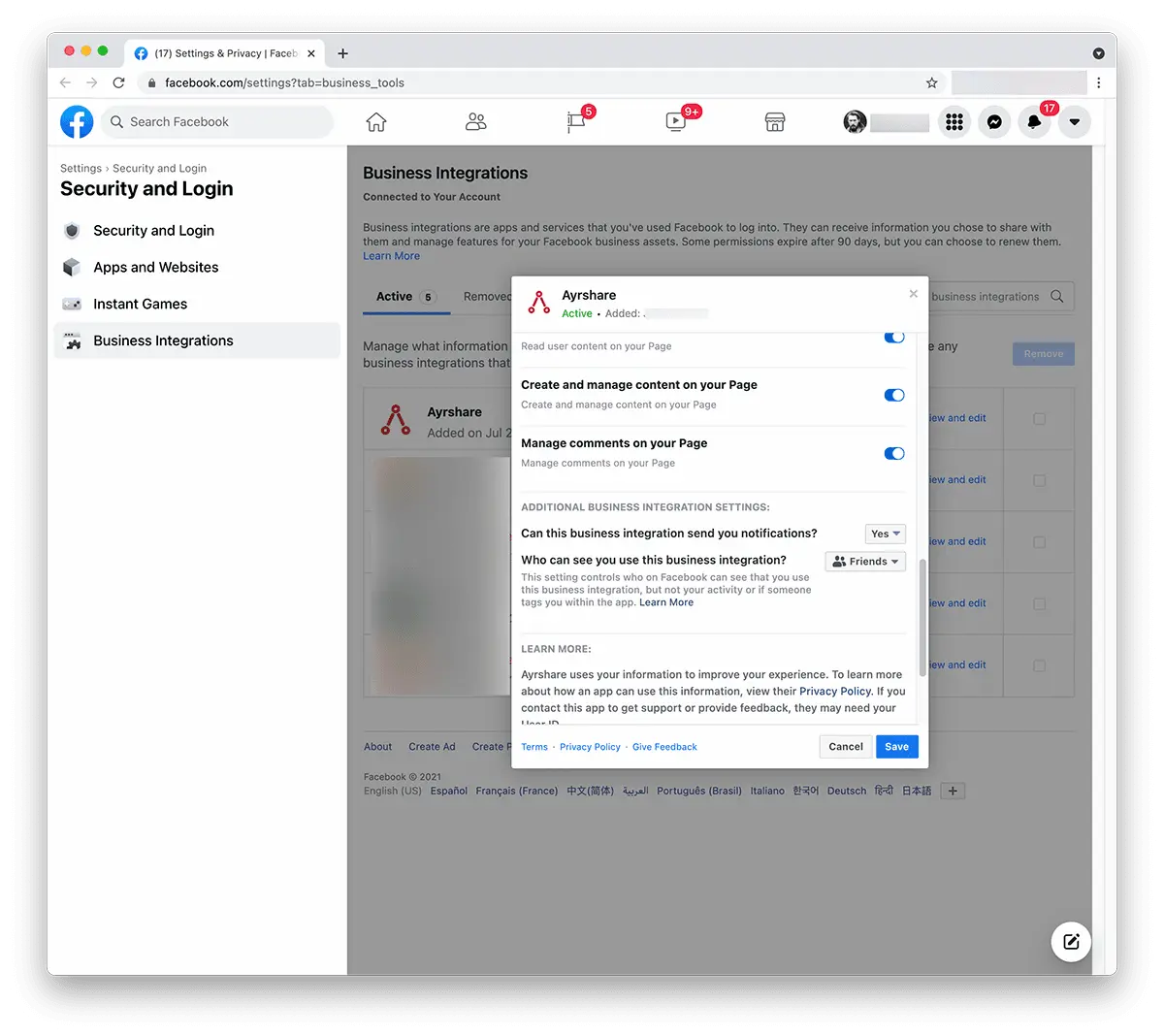
एक पॉप-अप दिखाई देगा। "Create and Manage Content on Your Page" पर नीचे स्क्रॉल करें और सुनिश्चित करें कि यह सक्षम है। यदि आप "Pages" के साथ एक चेकबॉक्स देखते हैं तो सभी पेजों का चयन करने के लिए इसे चेक करें।
<img src="https://mintcdn.com/ayrshare/XRYzr5UdPjyr_kPK/images/additional/allow%20FB%20permissions.webp?fit=max&auto=format&n=XRYzr5UdPjyr_kPK&q=85&s=537380da9a6964191c0810a6027e3462" alt="Review Ayrshare Facebook permissions" class="center" width="1200" height="1068" data-path="images/additional/allow FB permissions.webp" />

"**Save**" पर क्लिक करें।

[Ayrshare Dashboard](https://app.ayrshare.com/social-accounts) पर वापस जाएँ और Facebook को **unlink** और **relink** करें। अब आपके पास सही अनुमतियाँ होनी चाहिए।

## अभी भी Facebook अनुमतियों में समस्या है?

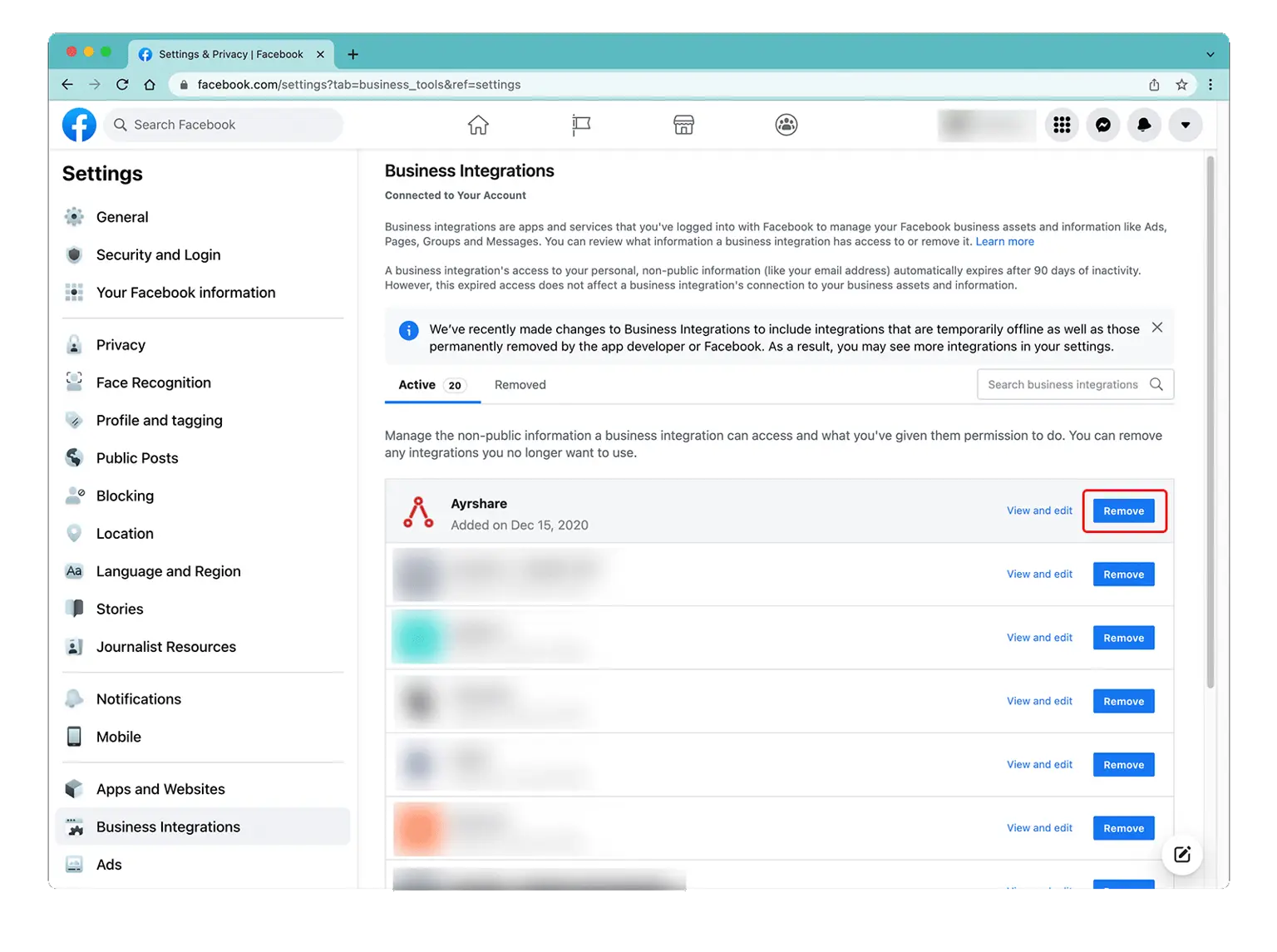
*यदि समस्या अभी भी बनी हुई है*, तो कृपया Business Integration के अंतर्गत [Facebook admin settings](/help-center/technical-support/facebook_posting_issues#facebook-business-admin-settings) पर वापस जाएँ और Ayrshare app को "Remove" करें।
[Ayrshare Dashboard](https://app.ayrshare.com/social-accounts) पर वापस जाएँ **unlink** और Facebook को **relink** करें।
<img src="https://mintcdn.com/ayrshare/xrGl9DrFFYfXkVdh/images/help-center/remove-a.webp?fit=max&auto=format&n=xrGl9DrFFYfXkVdh&q=85&s=b2300de11a253cc217b3c7aeddd6b50d" alt="Remove the Ayrshare app" class="center" width="1536" height="1145" data-path="images/help-center/remove-a.webp" />
